30KPa Touchscreen Cordless Vacuum: Smarter Daily Cleans
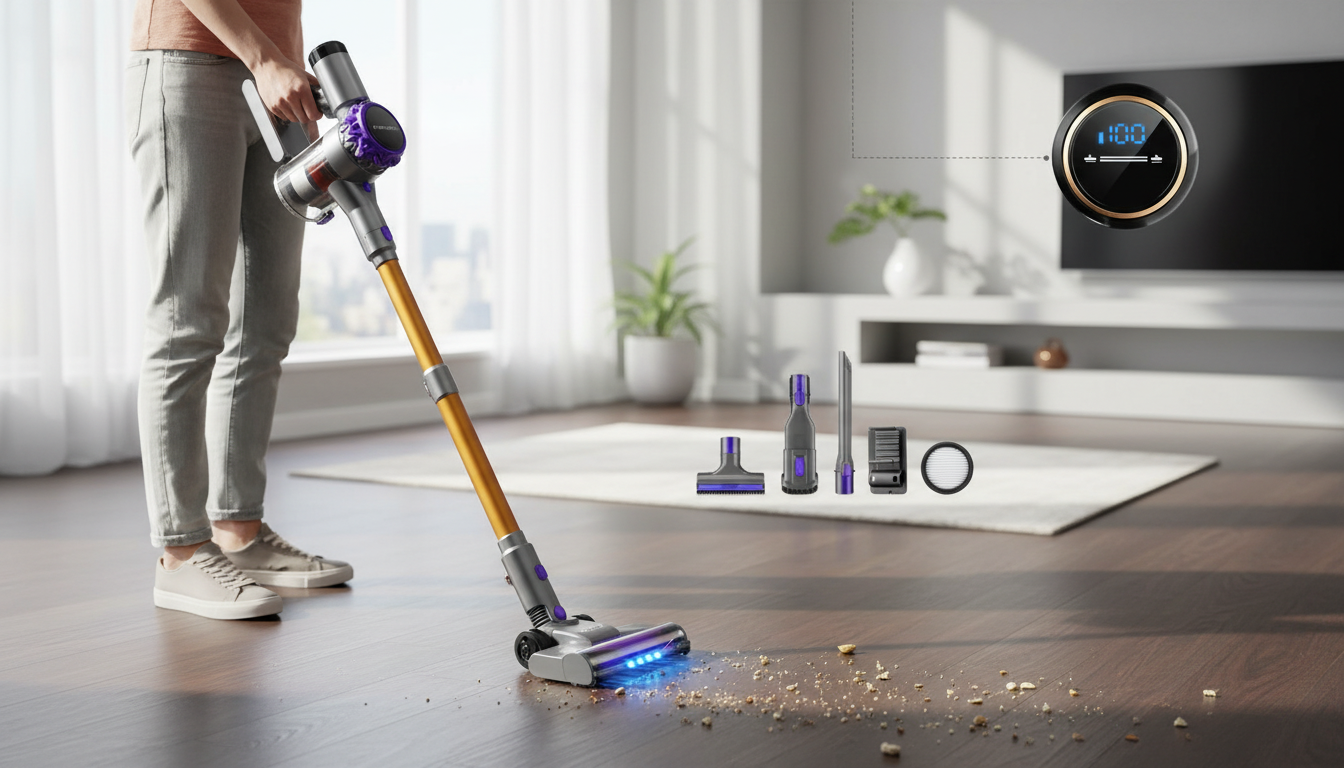
30KPa Cordless Vacuum Cleaner with Touchscreen: Everyday Cleaning With Smarter Control
A cordless vacuum with a touchscreen is built for the way most homes actually get cleaned: quick passes after meals, fast touch-ups in high-traffic lanes, and longer sessions on weekends. When you add a strong suction class like 30KPa and an interface that clearly shows modes and battery, everyday cleaning tends to feel less like a chore and more like a quick reset. Below is a practical guide to what 30KPa is good for, why a touchscreen matters, and how to use settings and attachments for floors, pets, and tight spaces.
What “30KPa” Suction Means in Daily Cleaning
“KPa” (kilopascals) is a suction measurement often used to compare pulling power across cordless models. In real homes, higher suction is most noticeable where debris resists lifting—think dust packed into rug fibers, grit in entryway mats, and crumbs lodged along baseboards or between couch cushions.
That said, suction numbers don’t work alone. Brush design, the airflow path inside the vacuum, and how clean the filters and bin are all affect what reaches the dust cup. A vacuum can have strong rated suction and still feel underpowered if the brush roll is tangled with hair or the filter is clogged.
Also, running max mode nonstop can cut runtime sharply. A more effective approach is to treat high power like a “boost” for the areas that need it, then drop back to standard mode for open hard floors.
Touchscreen Benefits: Faster Adjustments and Clearer Status
A touchscreen isn’t just a modern extra—it can remove friction from the cleaning routine. Instead of guessing which mode you’re in or waiting for the vacuum to slow down unexpectedly, a clear display makes the vacuum feel more predictable and easier to share among family members.
- Mode switching without guessing: quick toggles for hard floors vs. rugs vs. spot messes.
- Battery visibility: a quick glance helps plan whether to finish the upstairs or recharge first.
- Maintenance reminders: filter or blockage alerts can prevent a mid-clean drop in suction.
- Less “max-power autopilot”: clear status indicators can discourage overusing boost mode and help extend session length.
Key Specs to Check Before Buying
Two cordless vacuums can both claim strong suction, yet feel very different day to day. These are the specs and usability details that usually matter most once the vacuum is living in your home.
- Runtime and battery type: match runtime to your routine—quick daily passes versus longer whole-home sessions.
- Charging time and storage: a wall mount encourages grab-and-go use; freestanding storage can be better for renters who don’t want to drill.
- Dustbin capacity: bigger bins mean fewer trips to the trash, especially with pets or kids.
- Filtration: sealed airflow and fine filtration can reduce recirculated dust, a plus for allergy-sensitive households (see guidance on indoor air quality from the U.S. Environmental Protection Agency).
- Noise and weight: lighter builds reduce fatigue for stairs, curtains, and ceiling-corner cobwebs.
Feature Checklist for a Cordless Vacuum With Touchscreen
| Feature | Why it matters | Best for |
|---|---|---|
| 30KPa suction class | Improves pickup on rugs and crevices when airflow is maintained | Pet hair, entryways, mixed floors |
| Touchscreen controls | Quick mode changes and visible battery/status | Busy households, shared use |
| Multi-surface brush head | Reduces scatter on hard floors and improves carpet agitation | Apartments and multi-room homes |
| Crevice/brush tools | Targets edges, vents, keyboards, upholstery seams | Cars, couches, baseboards |
| Washable filters | Lower ongoing costs and steadier suction when maintained | Routine users |
Where This Vacuum Fits Best
A 30KPa cordless stick vacuum with smart controls tends to shine in homes where convenience drives consistency. The easier it is to start cleaning, the more likely quick messes get handled before they spread.
- Hard floors: fast pickup for crumbs, hair, and tracked-in grit with minimal setup.
- Low-to-medium rugs: stronger pull can improve debris removal compared with basic cordless models.
- Pet zones: daily fur control on couches, corners, and around feeding areas.
- Stairs and cars: cordless maneuverability helps in tight angles and confined spaces.
- Small-to-mid homes: easy to grab for frequent maintenance cleans.
Using Power Modes Wisely (Clean Faster Without Draining the Battery)
The fastest clean often comes from using the right mode at the right time—not the highest mode everywhere.
For broader best practices on keeping a home clean and maintaining tools, the American Cleaning Institute offers practical cleaning and maintenance guidance.
Maintenance That Keeps Suction Consistent
Product Snapshot: 30KPa Cordless Vacuum Cleaner with Touchscreen
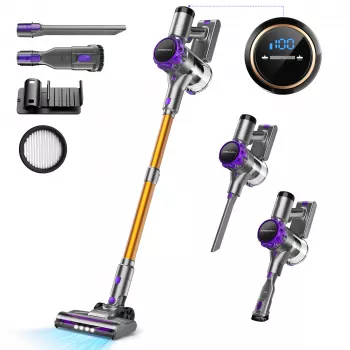
The 30KPa Cordless Vacuum Cleaner with Touchscreen is designed for cordless convenience with a modern interface that makes day-to-day control straightforward. It’s well suited to mixed surfaces when you pair the right attachment to the right spot—wide head for open floors, crevice tool for edges and car seats, and higher power for rugs and pet hair.
More In-Stock Picks
- Brunello Cucinelli Cotton T-Shirt
- Cozy Striped Baby Romper Jumpsuit for Newborns & Infants 0-18 Months
- Toddler Baby Goose Embroidered Knit Sweater – Cozy Fall & Winter Pullover
FAQ
Is 30KPa suction strong enough for pet hair and carpets?
It can be, especially for low-to-medium carpets and rugs, but results also depend on brush roll design and maintaining clear airflow. Use higher power on rugs and keep filters and the brush roll clean so suction stays consistent.
What does the touchscreen typically show on a cordless vacuum?
Most touchscreens display battery level, the selected power mode, and status or maintenance alerts such as filter cleaning reminders or blockage indicators. This helps manage runtime and keeps performance steadier over time.
How often should filters and the dust cup be cleaned?
Empty the dust cup frequently—often after each session in pet homes or heavy-use areas. Clean filters on a routine schedule, let them dry completely before reinstalling, and check the brush roll weekly if long hair is common.














Leave a comment